
Overview
The Narravero API enables seamless and automated communication between the production ERP/PIM system and the Narravero platform. Each product record is represented by a Tridy object on Narravero. The production ERP/PIM remains the master system, controlling creation, updates, and validation of all product data.
This tutorial walks you through the entire process, from product creation to final approval, using the API.
1. Goals
- Maintain data ownership: The ERP/PIM system remains the single source of truth.
- Ensure traceability: Each product instance has a unique Tridy-ID.
- Automate synchronization: All data changes are automatically pushed to Narravero.
- Guarantee consistency: Data is validated before being released to the live environment.
2. API Workflow Summary
3. Step-by-Step Example: Narravero Hoodie
Step 1 - Create an Interface
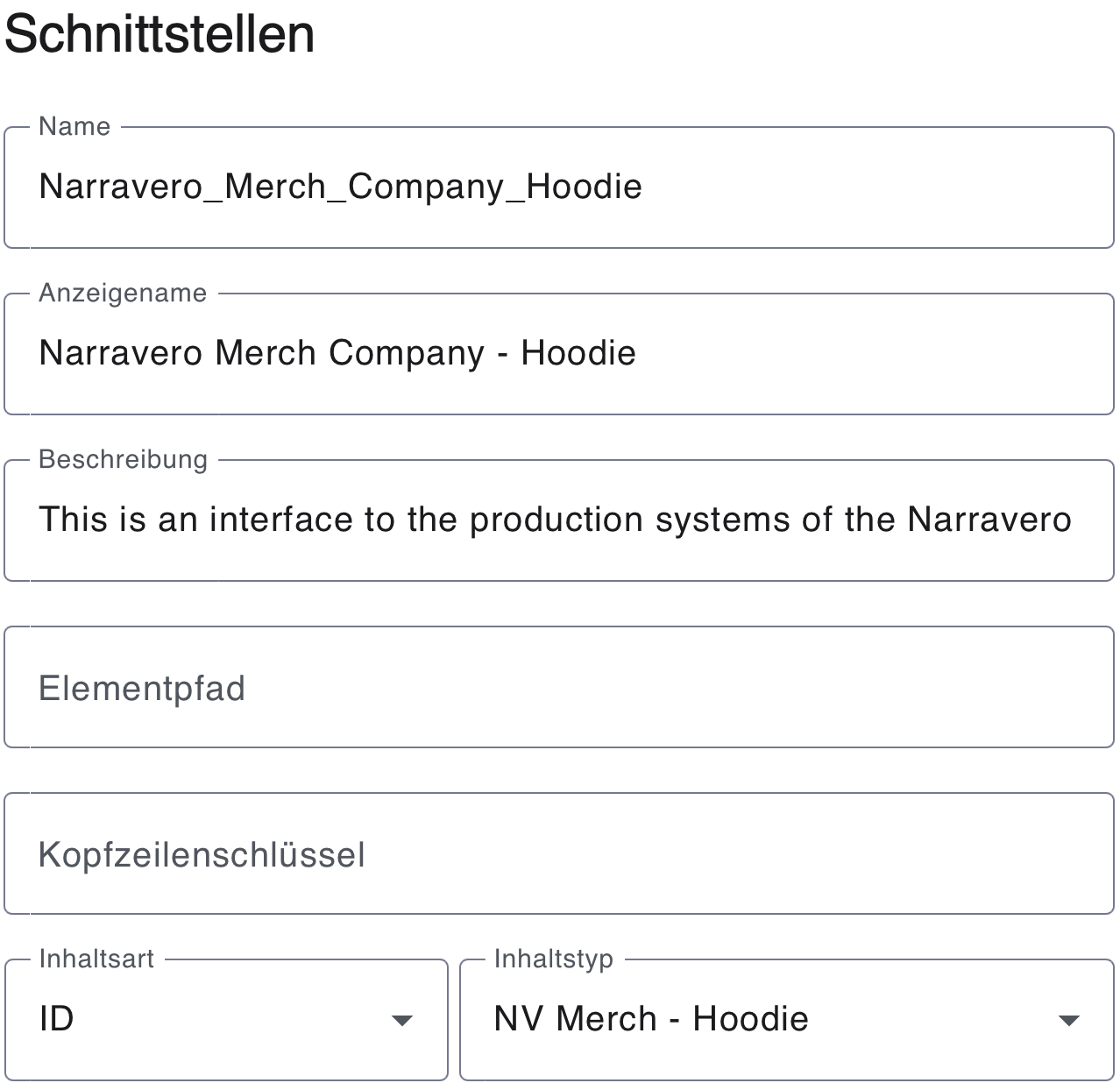
Start by opening the Narravero Content Studio and navigating to the “Interfaces” section. Click “Add new” to create a new interface.
In the interface settings, enter a Name, Display Name, and Description. Then, set the Content Type to ID and select NV Merch – Hoodie. This links the interface to the DPP template “NV Merch – Hoodie”. Once all settings are configured, click “Save” to create the interface.
Step 2 – Create the first instance
At the Textile Coloring Stage, the API interface is used instead of the Tracer. In the ERP system, a POST request is configured and sent to the Narravero system, creating a Tridy for a small black Hoodie. In the request header, the interface name “Narravero_Merch_Company_Hoodie” is specified to link the request to the corresponding DPP template for the Narravero Hoodie.
Request:
POST /v1/tridy/Narravero_Merch_Company_Hoodie
Host: https://api.narravero.com
Authorization: Bearer ;API_TOKEN;
Content-Type: application/json
{
"production_number": "18753950",
"size": "S",
"color": "Black"
}
Response:
[
{
"id": "jeYdCFSVv3xxVyBsH6uvzP",
"url": "https://nvero.app/NV-Hoodie/jeYdCFSVv3xxVyBsH6uvzP",
"ids": {}
}
]
Save the returned Tridy-ID (jeYdCFSVv3xxVyBsH6uvzP), it will be required for all subsequent actions.
Step 3 – Update product details
On the Hoodie Tailoring Stage, the Tridy needs to be updated. This is done using the Patch function, which pushes the new information directly into the Narravero system.
Request:
PATCH /v1/tridy/jeYdCFSVv3xxVyBsH6uvzP
Host: https://api.narravero.com
Authorization: Bearer
Content-Type: application/json
{
"name": "Max",
"location": "Guetersloh",
"date": "27.10.2025, 8:34"
}
Response:
{
"warnings": []
}
Step 4 – Validate data consistency
Request:
GET /v1/tridy/jeYdCFSVv3xxVyBsH6uvzP
Host: https://api.narravero.com
Authorization: Bearer
Response:
{
"production_number": "18753950",
"size": "S",
"color": "Black",
"date":"27.10.2025, 8:34",
"name": "Max",
"location": "Guetersloh"
}
Compare the response data with the information in the ERP/PIM system to ensure everything matches before giving final approval. For example, the Hoodie leaving for logistics is a small, black Hoodie made in Guetersloh, and the data has been validated.
4. Key Advantages of the Workflow
- Idempotent and traceable: Each product has a unique Tridy-ID for auditability.
- Data sovereignty: ERP/PIM retains full control over all data changes.
- Automated updates: Every modification can be synchronized in real time via
PATCH. - Validated releases: Only consistent, verified data is approved.
- Auditable communication: Each
POST,PATCH, andGETcan be logged for compliance tracking.
5. Summary
This API workflow ensures that every product instance:
- Is created once via a
POSTrequest, generating a Tridy record. - Is updated automatically through
PATCHrequests when changes occur. - Is validated via
GETbefore release. - Is approved through a final
PATCHrequest.
By following this process, you ensure data consistency, traceability, and reliability between your ERP/PIM system and Narravero.